$ ls topics/{postmortem,exchange,microsoft-365,deliverability}
·10 min read
How Microsoft 365 decides which tenant email belongs to
A new mail-flow rollout made Microsoft 365 attribute every customer's mail to our tenant. The undocumented rule behind it, and the fix.

Mailprotector
Engineering Team
TL;DR#
We’ve been building a new outbound mail-routing design for Shield, one that hands the
final leg of delivery back to each customer’s Microsoft 365 tenant. It relies on an Exchange
Online connector type called OnPremises, and we learned the hard way that for OnPremises
connectors, Exchange Online attributes traffic to a tenant by the TLS certificate the sender
presents, not by the message’s From or To addresses. Every Shield tenant relays through one
shared certificate, courier.shield.security. Its domain, shield.security, happened to be
an accepted domain in our own tenant. So the moment we cut our corporate tenant over to the
new flow, Microsoft started attributing every customer’s and partner’s relayed mail to us
and tripped its own abuse detection, blocking connectors and outbound. Rolling the change
back put customer and partner mail right within minutes, but Microsoft kept our own tenant’s
outbound relay blocked for 47 hours. The fix is the pattern Microsoft now prescribes: a
unique certificate identity per tenant.
What we were building#
The stickiest part of deploying mail security in front of Microsoft 365 is almost always DNS. Every record a partner has to touch to stand Shield up is another step that can go wrong and another support ticket down the line. So the goal of this mail-flow design was to get a Shield deployment down to as few moving parts as possible, and taking DNS changes off the list entirely is a big win for our partners.
Outbound is what usually forces those changes. If we deliver filtered mail to the internet ourselves, someone has to publish SPF and DKIM records authorizing our infrastructure to send as their domain. That’s a support burden and a deliverability risk.
So we built an outbound path that hands the last mile back to Microsoft: filtered mail is relayed into the customer’s own Microsoft 365 tenant, where Microsoft performs final internet delivery, signing with the customer’s own DKIM keys and sending from the customer’s own infrastructure. No DNS changes required to deploy.
The flow looks like this:
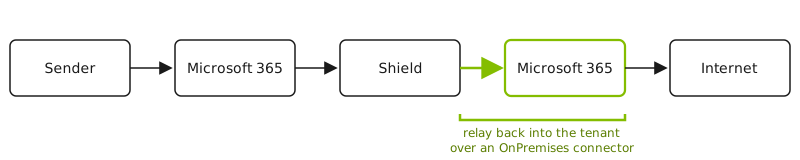
That “relay back into the tenant” leg requires an Exchange Online inbound connector, and for it to be allowed to relay outbound to the internet, the connector must be of type OnPremises.
A quick primer on Exchange Online connectors#
Connectors are how Exchange Online decides whether to trust mail arriving from outside the service, and what it’s allowed to do. Two things matter here.
The first is how the connector identifies incoming mail. An inbound connector can be
matched either by the sender’s IP address or by the TLS certificate the sending server
presents (the certificate’s subject/SAN domain). With RestrictDomainsToCertificate
turned on, the certificate becomes the authoritative identity for that connection.
The second is the connector type. A Partner connector represents another organization or a cloud service. An OnPremises connector represents your own servers, the hybrid “this is my on-premises mail environment” case. OnPremises is also what unlocks relaying outbound to the internet through the tenant.
The docs don’t make the consequence obvious. For an OnPremises connector, the certificate domain is an identity Exchange Online resolves against accepted domains, and accepted domains are globally unique to a single tenant. So the certificate does more than authenticate a connection; it identifies a tenant. The message envelope, who the mail is from and who it’s to, plays no part in that attribution.
The incident#
This was a careful rollout, not a flag flipped on a hunch. The new flow had run for weeks on our staging tenant, then on the production tenant we use for demos. Both behaved perfectly, inbound and outbound. So on a Wednesday morning we deployed the same change to our own corporate tenant, mailprotector.com, the one with real traffic, distribution groups, and the better part of two decades of accumulated configuration. That was the natural last step.
It went sideways within the hour, in three escalating ways.
First, Microsoft blocked our inbound connector, the door their service uses to accept our relayed mail. Their automated abuse detection had flagged the traffic as suspicious and blocked the connector. We eventually found where they’d tucked the block away, cleared it, and mail flowed again for a little while.
Then the worse one: Microsoft disabled outbound relay for our entire tenant. SMTP sending was switched off at the tenant level, so we couldn’t get our own mail out the door at all. That stayed stuck for a day or two while we waited on Microsoft to lift it.
The third symptom is the one that told us this was bigger than our tenant. Partners started getting bounces about a “connector threshold exceeded.” Their mail, on their own tenants, was failing because of something we’d changed on ours. Microsoft 365 is a multi-tenant service; one tenant’s mess is not supposed to land in another tenant’s mail flow. The failures were intermittent, too, which is the worst way for anything to break, because half-working is far harder to diagnose than fully broken.
It didn’t help that Microsoft was having its own Exchange Online delivery problems that same week, which nudged our first instinct in exactly the wrong direction. We rolled the new flow back instead. Within about fifteen minutes, partner mail was flowing normally again, and Shield was fully operational. Our own outbound on Microsoft 365 stayed dark far longer: Microsoft kept it blocked for 47 hours, releasing it on their schedule, not ours, and much of that stretch we spent unable to get a useful answer out of their support, who left us in a queue for fourteen hours before emailing back.
Root cause: attribution follows the certificate, not the envelope#
Every Shield tenant’s outbound relay runs through one shared component we call Courier, and
every Courier connection presents the same TLS certificate: courier.shield.security. One
name, for the whole fleet.
Separately, and this is the detail that had been harmless for years, shield.security was
an accepted domain on the mailprotector.com tenant. We’d added it early in development. It
did nothing visible. It just sat in the accepted-domains list.
The new flow changed one more thing. It flipped the relay connector from type Partner to type OnPremises, and OnPremises is exactly where attribution stops following the envelope and starts following the certificate.
Put the three together and the trap springs. Mail arrives over an OnPremises connector
presenting courier.shield.security. Exchange Online resolves that certificate name against
accepted domains, finds shield.security sitting in the mailprotector.com tenant, and
concludes the traffic is ours. Not just our traffic, but every customer’s and every
partner’s mail, because all of it rides the same Courier certificate. Our tenant became the
attribution sink for the entire fleet, Microsoft’s abuse detection saw one tenant apparently
firehosing the internet, and it started slamming doors.
That is why our staging and demo tenants came through clean. Neither had shield.security
in its accepted domains, so the certificate name resolved to nothing in particular and
attribution behaved. Only mailprotector.com had all three pieces lined up at once: the
OnPremises connector, the shared certificate, and the matching accepted domain. We’d tested
everywhere except the one tenant where the latent setting lived.
Microsoft has since written this configuration up as an anti-pattern in a Message Center notice, MC1226222: an OnPremises connector that authenticates with a certificate whose subject/SAN is not an accepted domain of the tenant. That’s the shape of our incident exactly. The notice landed in early 2026, after we’d already designed and built this path. It’s admin-facing and not part of the public Microsoft Learn docs; the canonical copy lives in each tenant’s Message Center, and it’s mirrored publicly for anyone without a tenant to check.
That same notice finally puts the attribution precedence in writing. For mail arriving over an OnPremises connector, Exchange Online resolves the tenant in this order:
- the domain on the TLS certificate the sending server presents,
- the P1 MailFrom (envelope sender) domain,
- the P1 RcptTo (recipient) domain.
The certificate sits at the top, above both envelope fields. Public Microsoft Learn docs still don’t lay this order out, so the rule worth internalizing is the one we learned by getting it wrong: for OnPremises relay, a certificate whose domain is an accepted domain in some tenant attributes the mail to that tenant. Exchange Online treats the certificate domain as the connector’s tenant identity, and so should you.
The fix: one certificate identity per tenant#
Microsoft’s prescribed fix, the one MC1226222 now spells out, is to give each tenant its own certificate whose subject/SAN domain is a verified, accepted domain in that specific tenant. That makes attribution unambiguous by construction:
- Each tenant’s relay leg presents a distinct certificate.
- That certificate’s domain is verified and accepted only in the one tenant it belongs to (verified domains are globally unique), so Exchange Online can only attribute it there.
- Attribution is isolated per customer, and so is any block that follows from it: one customer’s volume, complaints, or abuse flag can’t bleed onto another, or onto us.
- Microsoft 365 still DKIM-signs as the customer, because the customer’s real domains remain their own accepted domains; the certificate domain is purely the connector’s identity.
In our case the certificate domain is a per-tenant hostname, a generated string unique to
each customer, under a namespace we control. That lets us automate both certificate issuance
and the Microsoft 365 domain verification without any customer DNS changes. The connector’s
TlsSenderCertificateName is set to that per-tenant domain, and that same domain is
registered as an accepted domain in the tenant. One value, two places, and the identity
lines up end to end. The mechanism that swept the whole fleet into one tenant becomes the
control point we use to keep every tenant separate.
Takeaways#
- For OnPremises connectors, the TLS certificate domain is the tenant identity. Attribution doesn’t follow the message envelope, so design as if the certificate names the tenant.
- Never share one connector certificate across tenants you don’t want coupled. Even when it appears to work, you’ve tied every customer’s deliverability to a single connector identity Microsoft can act against all at once. Give each tenant its own.
- Watch your own tenant. Our trap was that our product domain was an accepted domain in the company’s own Microsoft 365 tenant, so the day that tenant ran an OnPremises connector keyed to the shared certificate, it swept up the entire fleet’s mail.
- The certificate’s subject/SAN has to be an accepted domain of the attributing tenant for a healthy OnPremises relay. If it isn’t, you’re in the anti-pattern Microsoft now warns about in MC1226222.
- “It works in the demo” can hide a coupling bug. Our staging and demo tenants passed clean because they lacked the one setting that mattered, which masked the problem right up to the tenant that had it. When a design happens to work but rests on a shared global identity, treat that as a risk, not a validation.
We’re moving Shield to the per-tenant certificate model across the board. The automation behind it, issuing and rotating a certificate per tenant and verifying each domain in Microsoft 365 without customer DNS changes, is its own story, and one we’ll tell in a follow-up.
Mailprotector
Engineering Team
The engineering team behind the products at Mailprotector.