$ ls topics/{shield,exchange,microsoft-365,smtp}
·11 min read
The evolution of Shield's mail flow architecture
Three versions of Shield's mail flow architecture, from a blunt MX record to a design that hands the last mile back to Microsoft, and what changed each time along the way.

Christian Maddox
Senior Software Engineer
Put an email security layer in front of Microsoft 365 and every message crossing it has to answer the same three questions: how does it get routed to us in the first place, who does the final delivery, and how much of that setup depends on the customer’s own DNS. Shield has answered those questions three times, with three mail flow designs we call Alpha, Bravo, and Charlie. Alpha is the design Shield launched with in March 2024, Bravo followed in January 2025, and Charlie is rolling out this month. This post covers how the design evolved across those three versions, and how we ended up handing the last mile, the final hop that delivers a message to its destination, back to Microsoft.
Shield is built around three SMTP gateways, each of which started as a standalone SMTP server with one job. Frontline is the inbound edge: mail headed toward a customer arrives here first, at <domain>.in.shield.security. Outpost is the outbound edge, <domain>.out.shield.security, where a customer’s own outgoing mail lands. Courier is the last mile, the mail server that takes a scanned message and hands it to wherever it’s ultimately going. Each gateway drops the message on a queue, and the Shield app pulls it off to do the actual filtering. Those three roles carry through every version, though not always as the same software. What changed across Alpha, Bravo, and Charlie was how Microsoft knows when to route mail to Shield, and how the last mile delivery is handled.
Alpha: point the MX at Shield#
The first version was the bluntest thing that works. To put a domain behind Shield, you changed its MX record to point at Frontline. That was the entire inbound setup. Mail from the internet looked up the domain, found Frontline, and delivered there first, before Microsoft ever saw it. There was no transport rule and no connector in the customer’s Microsoft 365 tenant routing anything to us, because there was nothing to route: the public MX record already sent every inbound message our way. We filtered it, and Courier delivered it on to the mailbox.
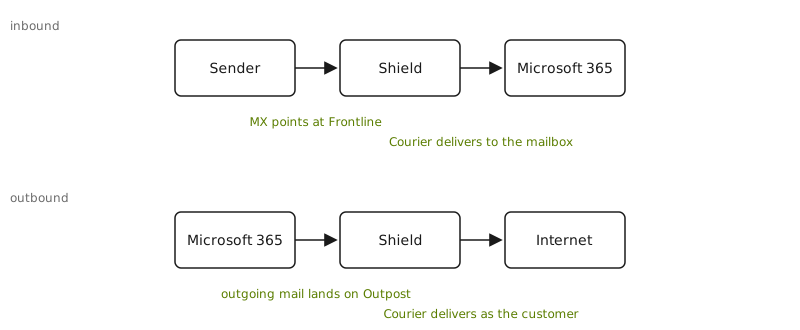
On its way outbound, a customer’s outgoing mail left Microsoft, went to Outpost, got filtered, and Courier delivered it to the world. Because Courier was sending as the customer’s domain, the customer’s DNS had to say so: an SPF update to authorize our infrastructure, and DKIM records so the mail we sent on their behalf verified. Without those, everything we relayed outbound looked like a forgery to the receiving side.
All of it depended on DNS, and DNS was the part that hurt. There was no Entri integration yet to automate DNS changes for customers, so every record was edited by hand, one domain at a time, in whatever registrar or DNS host the customer happened to use. Then you waited. A record is not live because you saved it; it’s live once it has propagated, and until then you can’t verify the domain is set up correctly. A customer with a dozen domains went through a dozen rounds of the same manual change and the same wait. It was the slowest and most failure-prone part of every onboarding, and it got worse in a straight line with how many domains a customer brought. Everything that came after Alpha was, one way or another, an attempt to spend less time waiting on someone else’s DNS.
Alpha’s inbound design rested on that MX record. Routing a domain through Shield was all or nothing, decided once in the DNS zone. We owned last-mile delivery in both directions, which meant we also owned the deliverability of every message we sent, with the customer’s reputation riding on records we’d asked them to publish.
Bravo: go MX-less with connectors#
Bravo set out to eliminate the MX record change. Instead of relying on the public MX record to divert inbound mail, we configured Exchange Online directly, with connectors and transport rules. Connectors are how Exchange Online exchanges mail with an outside system, and transport rules decide which messages get sent through them. The MX record stayed wherever it already was; pointing it at Frontline dropped from a requirement to optional. The three gateways stayed put; what changed was how Microsoft handed mail to them.
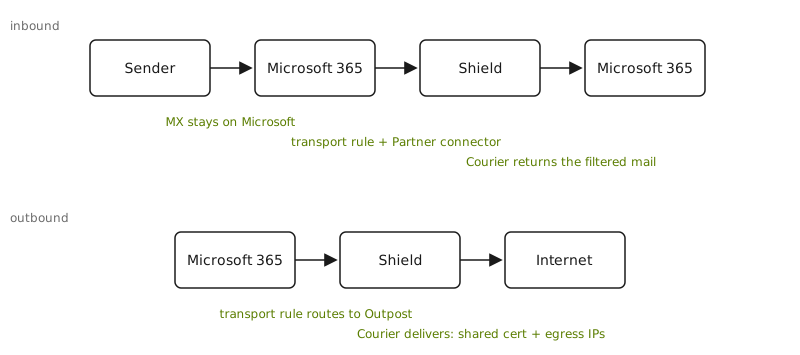
The rules routed by domain. Inbound, a transport rule matched on the recipient domain with RecipientDomainIs and sent the message out a Partner connector aimed at Frontline. Outbound matched on the sender domain with SenderDomainIs and routed to Outpost. To keep the loop from feeding on itself, and to skip Microsoft’s own spam filtering on mail we’d already scanned, the rules also keyed on our egress addresses with SenderIpRanges, drawn from the pool of IPs Courier sent from. The connectors trusted us by a shared TLS certificate, *.shield.security, and by that same IP list.
Last-mile delivery was unchanged from Alpha. Inbound, Courier handed the filtered message back to Microsoft 365 for mailbox delivery, which is why the transport rules needed that IP-range exception: without it, the returning mail would match the inbound rule and route straight back out to Shield. Outbound, Courier still relayed the finished message to the internet, carrying the envelope details along with each message and communicating delivery results back to Shield.
Bravo was a real gain in control, but it did not eliminate the DNS work. We now DNS-verified the customer’s domains and set them as InternalRelay accepted domains in the tenant (an accepted domain is one the tenant agrees to handle mail for), so onboarding still walked domain by domain and still waited on propagation before a domain would verify. Routing by IP added its own upkeep: Courier’s egress addresses were pinned into every connector and every transport rule, so when that pool changed, the change had to fan out to every tenant we managed. And the shared certificate, the one identity every customer’s Courier traffic presented, was a coupling we didn’t fully appreciate until it bit us. That’s its own story, and a key factor in the design of the next version.
Bravo’s routing was more precise than a blanket MX record, matching on domain and IP instead, but it was still domain-shaped and still all or nothing per domain. And the precision had a cost: we now kept lists of domains and IPs synchronized across every tenant, and every tenant’s Courier traffic leaned on the same shared certificate.
Charlie: route by user, give the last mile back to Microsoft#
Charlie made two changes, each big on its own. The last mile moved back to Microsoft: instead of Shield delivering to the internet or the mailbox ourselves, Microsoft does the final delivery. And routing moved to group membership: whether mail flows through Shield is now decided per user rather than per domain, with trust resting on a per-tenant TLS certificate instead of domains and IP addresses. Together they add up to what we call zero-configuration routing: mail reaches Shield and comes back without the customer changing an MX record, publishing a DNS record, or maintaining any per-domain setup.
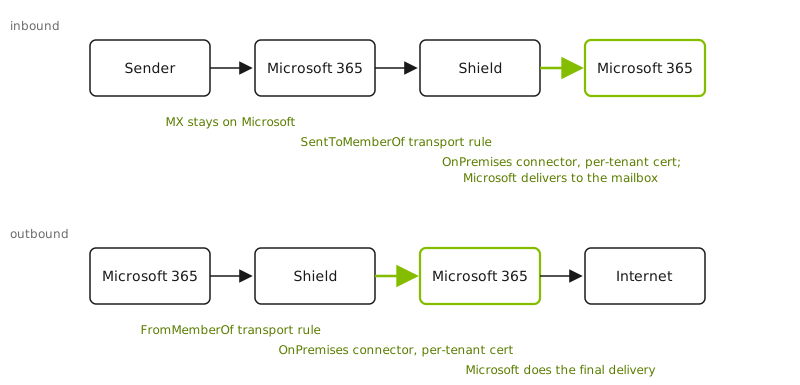
Start with DNS, since that’s the part that kept hurting. In Charlie the MX record stays on Microsoft. From the internet’s point of view the customer’s mail flow looks like an ordinary Microsoft 365 tenant: SPF points at spf.protection.outlook.com, DKIM is Microsoft’s. We no longer ask the customer to authorize our infrastructure to send as them, because we no longer do the final internet delivery. The last mile hands the mail back to Microsoft, and Microsoft delivers it, so DKIM signing became Microsoft’s job. That eliminated the biggest chunk of deployment DNS work: there are no DKIM records to publish for each domain, because the customer’s existing keys in Microsoft 365 keep doing the signing. The order of operations matters too. Microsoft signs each message at the final hop, after Shield has made its last changes (removing the HUD, applying Workflows), so the message that goes out to the world always carries a valid signature. The only domain Shield verifies is one we own end to end, a per-tenant courier hostname under a zone we control. Customer DNS comes off the onboarding critical path, and with it the per-domain, wait-for-propagation loop that made Alpha and Bravo slow.
Routing changed to match. The transport rules no longer key on the customer’s domains or on our IPs. Inbound routes on membership in a mail-enabled security group with SentToMemberOf, outbound on the sending group with FromMemberOf, which makes routing through Shield a property of group membership instead of a blanket per-domain switch. In place of the IP-range exception that used to keep filtered mail from looping, the rules recognize mail Shield has already processed by a secret scoped to the tenant. Group membership and a scoped secret, both belonging to the one tenant, replace the domain lists and the shared IP pool.
Routing at the user level is what makes a partial rollout possible. Deploying Charlie prepares the tenant, the connectors, the transport rules, the certificate, and the security group, without changing mail flow for anyone, because rules that match on group membership match nobody until the group has members. An admin can add a few users, watch Shield handle their mail for a few days, then roll out the rest of the organization. In Alpha and Bravo that decision was all or nothing per domain; one of our partners called it the “YOLO” approach to deploying. In Charlie, inbound and outbound routing follow the user.
The last mile changed the most. Filtered mail now returns to the tenant in both directions: Microsoft delivers inbound messages to the mailbox and relays outbound messages on to the internet. The inbound connector that accepts that relayed mail flipped from a Partner connector to an OnPremises one, which is what lets it relay back out through the tenant, and it dropped the IP pin in favor of a certificate. This time each tenant gets its own certificate instead of the shared *.shield.security cert, and its domain is that tenant’s verified courier accepted domain. For an OnPremises connector Microsoft attributes traffic by the certificate the sender presents, so a per-tenant certificate keeps every tenant’s mail attributed to itself and to nobody else. We learned that rule the hard way and wrote it up.
Courier itself stopped being a separate SMTP server. Once the last mile went back to Microsoft, Courier no longer had to be a full internet-facing mail server; it just had to open one authenticated SMTP session into a tenant. So we moved it inside the Shield app as a built-in delivery step. It opens an encrypted SMTP connection presenting the tenant’s certificate, and records the delivery result inline, with no external service and no callback. Handling delivery inside the app also gave us control of the TLS handshake itself, so each delivery presents the right org-specific certificate, the identity the whole Charlie design hangs on. The setup process became a first-class part of the app too, a Deployment built from ordered steps that are safe to re-run, so bringing a tenant onto Charlie is a tracked run rather than a pile of status flags.
Takeaways#
Each version rethought the same three things: how mail gets routed to us, who does the final delivery, and how much of that depended on the customer’s own DNS. Alpha routed by MX record and delivered the last mile itself in both directions, at the cost of touching every domain’s DNS by hand. Bravo kept the last mile but moved routing into Exchange connectors and transport rules, trading the MX record for lists of domains and IPs, and a shared certificate that we had to keep in sync across every tenant. Charlie handed the last mile back to Microsoft entirely and moved routing to group membership and a per-tenant certificate, which took customer DNS off the onboarding path for good.
A Charlie deployment doesn’t wait on customer DNS, because it doesn’t touch any. Microsoft keeps the MX, keeps signing the mail, and does the final delivery, while Shield sits inside the tenant, identified by a certificate scoped to that tenant alone.
Charlie is rolling out this month, and for the first time organizations running Alpha or Bravo have the option to upgrade.